Woken up with a dull headache, or hit a wall at three in the afternoon for no clear reason? Sealed, well-insulated homes hold onto the air you have already breathed. Carbon dioxide climbs quietly, and you feel the effect long before you would ever suspect the cause. Smart CO2 monitors put a hard number on that invisible build-up. The catch is that a surprising share of the devices sold as CO2 monitors do not contain a carbon dioxide sensor at all.
Our picks at a glance
- Most accurate Aranet4 Home
- Best screen SwitchBot Meter Pro CO2
- Works across platforms SONOFF AirGuard CO2
- Cheapest with Thread IKEA ALPSTUGA
CO2 Monitors Compared at a Glance
| Monitor | Best for | Sensor and accuracy | Smart home | Price |
|---|---|---|---|---|
| Aranet4 Home | Accuracy | NDIR, ±(30 ppm + 3%) | Bluetooth app only | About $150 to $190 |
| SwitchBot Meter Pro CO2 | Best screen | NDIR, ±(50 ppm + 5%) | Needs a SwitchBot Hub | $69.99 |
| SONOFF AirGuard CO2 | Automation | NDIR, ±(50 ppm + 5%) | Matter over Wi-Fi | $49.90 |
| IKEA ALPSTUGA | Cheapest Thread | Thermal conductivity, roughly ±(100 ppm + 10%) | Matter over Thread | $34.99 |
Prices checked in October 2026 on the manufacturers’ pages. Aranet lists no price, so its figure is a typical retailer range. Accuracy figures are the published specs, apart from IKEA’s, which comes from independent testing.
How We Picked These Monitors
We started with the sensor, because that decides whether the number means anything. Then we compared published accuracy, how each device gets its reading into your smart home, and what you have to buy on top. Specs come from the manufacturers’ own pages and datasheets, with accuracy notes from independent testing where it exists.
What Your CO2 Number Actually Means
Outdoor air sits at roughly 400 to 420 ppm, or parts per million. That is your floor. Everything above it is air that has already been through somebody’s lungs.
Manufacturers are unusually consistent on where the lines fall. Both Aranet and SwitchBot ship the same default bands:
- Below 1000 ppm: comfortable, well ventilated air
- 1000 to 1400 ppm: stuffy, and worth opening something
- Above 1400 ppm: act now
Those breakpoints are not arbitrary. They trace back to Harvard research by Joseph Allen and colleagues, which found cognitive performance starting to slip above 1000 ppm and dropping sharply past 1400 ppm.
For context, a closed bedroom with two sleeping adults can pass 1200 ppm within about ninety minutes. That is a normal night, not an extreme case.
The Sensor Type That Decides Everything
This is the single most important thing to check before you spend anything, and almost no product listing makes it easy.
NDIR stands for non-dispersive infrared. The sensor shines infrared light through a small chamber and measures how much of it the carbon dioxide absorbs. This is a direct measurement of the actual gas, and it is what commercial HVAC equipment uses. Good consumer units specify accuracy around ±(50 ppm + 5 percent of reading).
eCO2 is the trap. The “e” stands for estimated. These devices contain a volatile organic compound sensor and calculate a carbon dioxide figure from it. Errors of 500 ppm or more are common. Worse, the reading responds to things that are not breath, so a spray of deodorant or a glass of wine near the device can send it climbing. If a listing says eCO2, or quotes no sensor type at all at a suspiciously low price, walk away.
Thermal conductivity is a newer third option that sits between the two. It measures a physical property of the air rather than estimating from an unrelated gas, so it is a real measurement. It is simply a less precise one, with wider tolerances and noisier readings. It tracks the shape of the day correctly while being loose about the exact figure.
Accuracy and Automation Are Two Separate Purchases
Plenty of dedicated monitors talk over Bluetooth alone. Bluetooth can absolutely reach a hub, but only if something within range is listening and speaks that particular device’s language. SwitchBot sells a hub built for its own sensors, so the reading travels. Aranet sells no home hub at all, which leaves your phone or a do-it-yourself setup as the only listeners. Ask the question directly before buying: what picks this reading up, and is it something I already own?
So the question is not which radio the sensor uses. It is who owns the path out. SwitchBot’s route works well and works only as long as you keep buying SwitchBot. Matter takes the vendor out of the middle, which is why the cheapest device here reaches all four major platforms while the most expensive reaches none. Neither answer is wrong. Just know which one you are choosing, because it decides what else you have to buy. If the open route appeals, our guide to Matter and Thread covers how that layer fits together.
Aranet4 Home: The Accuracy Benchmark
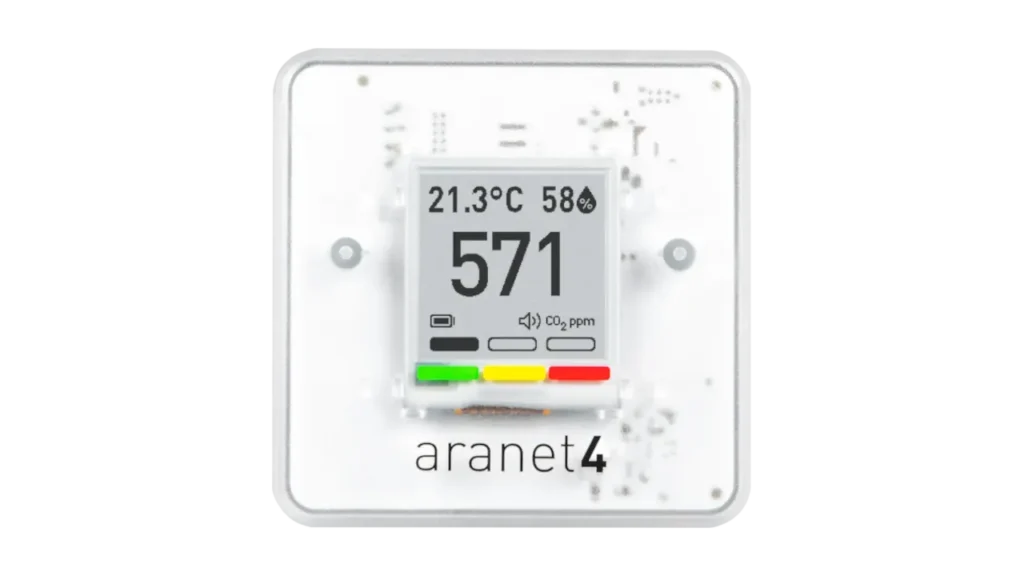
Image Credit: Aranet
The Aranet4 Home is the device researchers and building scientists reach for, and it earns that on the specification sheet. It uses a Senseair Sunrise NDIR sensor rated at ±(30 ppm + 3 percent of reading), which is genuinely tighter than the rest of this list.
The less obvious advantage is calibration. Sensors arrive from Senseair already calibrated, and Aranet then verifies each production batch after assembly against two reference points, one in a nitrogen atmosphere at zero ppm and another above 2000 ppm. No other device here documents that step.
An e-ink display keeps power draw very low, and the unit runs for years on two AA batteries. Aranet quotes up to four years, though the datasheet notes this figure is extrapolated and measured with Bluetooth switched off, so treat it as multi-year rather than a promise.
Pros
- Tightest published accuracy of any monitor here
- Batch-verified factory calibration after assembly
- E-ink screen readable across a room
- Multi-year battery life on standard AAs
- No subscription and no account required
Cons
- Bluetooth only, with no ecosystem support
- Cannot trigger fans, plugs, or ventilation
- Sits at the top of the price range
- Accuracy spec narrows outside 15 to 35 degrees Celsius
- Home Assistant users need the sensor physically nearby
Who this is actually for: somebody who wants to know the truth about a specific room and act on it themselves. Bedroom sleepers, home office workers, and anybody carrying a monitor between rooms or into a classroom. It is a measuring instrument, not a smart home component.
SwitchBot Meter Pro CO2: The Best Screen, With Conditions
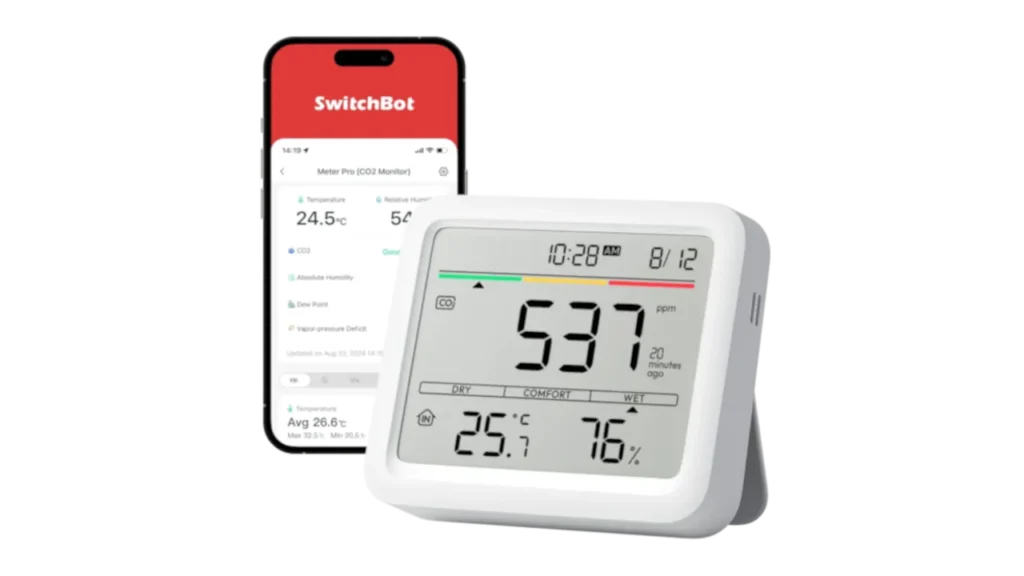
Image Credit: SwitchBot
The SwitchBot Meter Pro CO2 uses a Swiss Sensirion NDIR sensor rated at ±(50 ppm + 5 percent) across a 400 to 9999 ppm range. The five-in-one display shows carbon dioxide, temperature, humidity, time and a comfort indicator at once, which makes it the easiest unit here to read at a glance.
Two details deserve more attention than they usually get. First, power decides how fast it reads. On USB-C, SwitchBot says the carbon dioxide value updates every second. On batteries, its own page contradicts itself: the marketing copy promises every five seconds, while the FAQ says every thirty minutes. If the FAQ is right, a reading that updates twice an hour is fine for noticing a pattern but useless as an automation trigger, so the power choice quietly decides what the device can do.
Second, everything beyond the local screen requires a SwitchBot Hub. App alerts, data export, and every voice platform depend on it. Onboard storage covers 38 days, the app holds two years, and SwitchBot states that keeping data beyond that requires payment. That is worth weighing if you care about keeping your data local. Our guide to hidden smart home fees shows why it pays to check this before you buy.
Pros
- Large five-in-one display readable from across the room
- True NDIR sensor with solid published accuracy
- Reaches Alexa, Google Home, SmartThings and Siri Shortcuts
- Flexible wall mount and adjustable stand
- Manual calibration available in the app
Cons
- Requires a separate hub for anything remote
- Battery mode refreshes carbon dioxide only every thirty minutes
- Cloud history beyond two years becomes a paid feature
- Full speed needs a USB-C cable and outlet
Who this is actually for: anybody already inside the SwitchBot ecosystem, or somebody who wants one screen that answers several questions at once. Run it on USB-C if automation matters to you.
The Cross Platform Answer: SONOFF AirGuard CO2
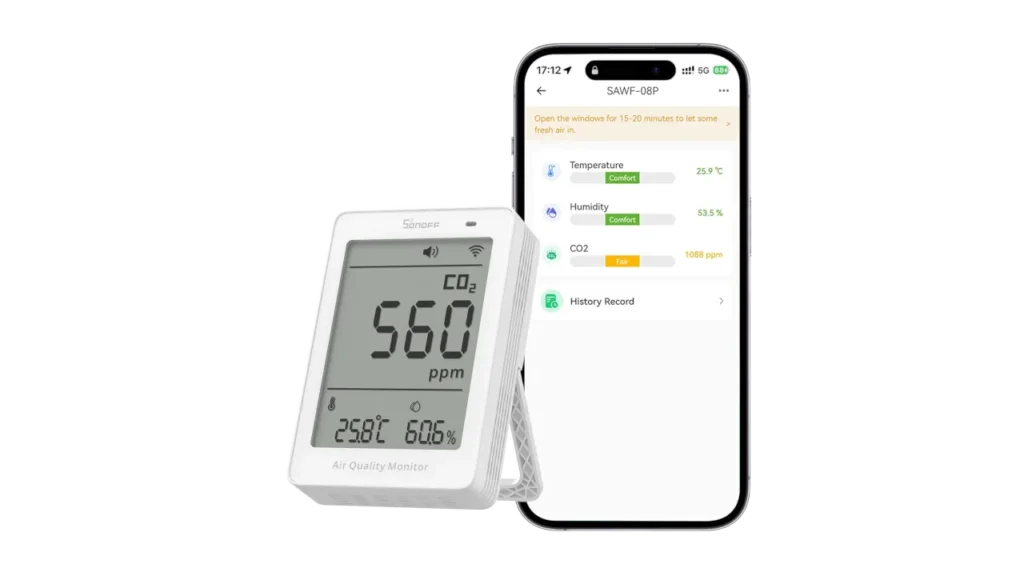
Image Credit: SONOFF
The SONOFF AirGuard CO2 monitor, model SAWF-08P, is the one device here that reaches every major ecosystem without an intermediary. It carries a genuine NDIR sensor rated at ±(50 ppm + 5 percent), refreshing every five seconds. It also reports temperature and humidity, and SONOFF lists it at $49.90.
It speaks Matter over Wi-Fi rather than Thread, which sounds like a limitation and is actually a convenience. There is no Thread border router to buy and no vendor hub in the path. It joins Apple Home, Google Home, Alexa and SmartThings directly, and the reading is available as an automation condition in all of them. It does still need a Matter controller on your network, such as a HomePod, an Echo or a Nest Hub, which most Apple, Google and Alexa homes already have.
The compromise is power. It runs from USB-C only, so it has to live within reach of an outlet. In a bedroom or home office that is usually fine. In a nursery or a spare room it might dictate where the unit sits, which matters more than it sounds given how much placement affects the reading.
Pros
- Works natively with all four major ecosystems
- No hub or border router required
- Genuine NDIR sensor at a low price point
- Five-second refresh supports real automation
- Readings feed ventilation and fan routines directly
Cons
- Mains powered only, with no battery option
- Placement limited by proximity to an outlet
- Measures carbon dioxide only, with no particulate sensing
- Newer product with a thinner track record
Who this is actually for: anybody whose goal is automation rather than measurement. If you want carbon dioxide to trigger a fan, an air purifier or a ventilation system, this is the straightforward route.
IKEA ALPSTUGA: The Cheapest Thread Option
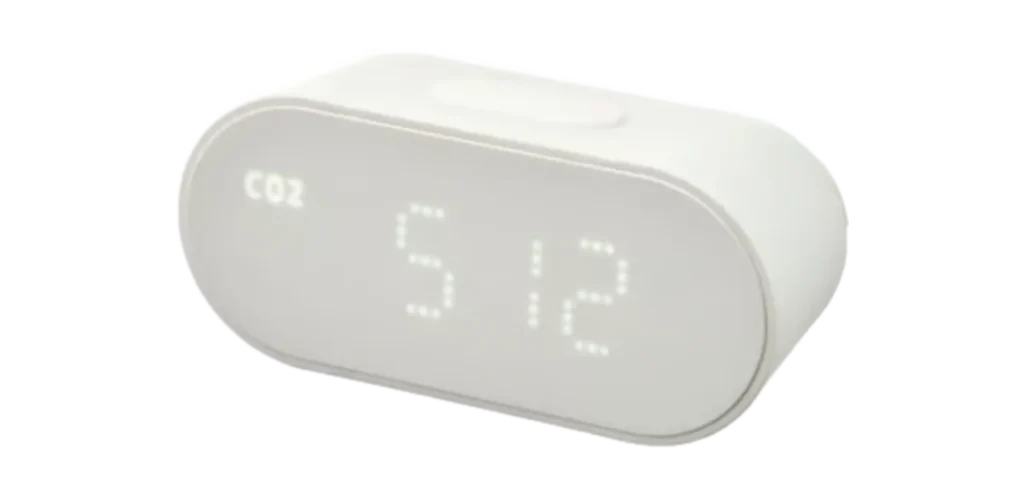
Image Credit: IKEA
The IKEA ALPSTUGA is the least expensive way into Matter over Thread, and it adds PM2.5 particulate sensing alongside carbon dioxide, temperature and humidity. Because it runs on USB-C power, it also acts as a Thread router for nearby battery devices, which is a genuine bonus for a sensor at this price. IKEA lists it at $34.99 and sells the USB-C power adapter separately, with its SMÅHAGEL power supply kit at $7.99, so budget a little extra.
Be clear about what is inside it. IKEA uses the Sensirion SEN63C module, whose carbon dioxide element is a thermal conductivity sensor rather than NDIR. Independent hands-on testing puts accuracy at roughly ±100 ppm plus 10 percent of the reading, with noticeably noisy output. Reviewers report the figure drifting by 70 to 80 ppm within minutes in a stable room, and at least one owner found a consistent offset against better sensors.
Worth saying plainly: this is not the eCO2 trap. It is a real measurement, just a looser one. It will tell you correctly that the bedroom got stuffy overnight. It will not tell you precisely how stuffy.
Pros
- Cheapest entry to Matter over Thread
- Adds PM2.5 particulate sensing at the same price
- Acts as a Thread router for battery devices
- No vendor hub, app or account required
- Tracks daily ventilation patterns reliably
Cons
- Thermal conductivity sensor, not NDIR
- Accuracy roughly double the tolerance of rivals
- Readings are noticeably noisy minute to minute
- Display shows only one value at a time
- Loses display settings after a power interruption
Who this is actually for: somebody who wants carbon dioxide as an automation input rather than a precise figure, and who already has a Thread border router. Excellent as a trigger, weak as an instrument.
When CO2 Is Not Your Only Question
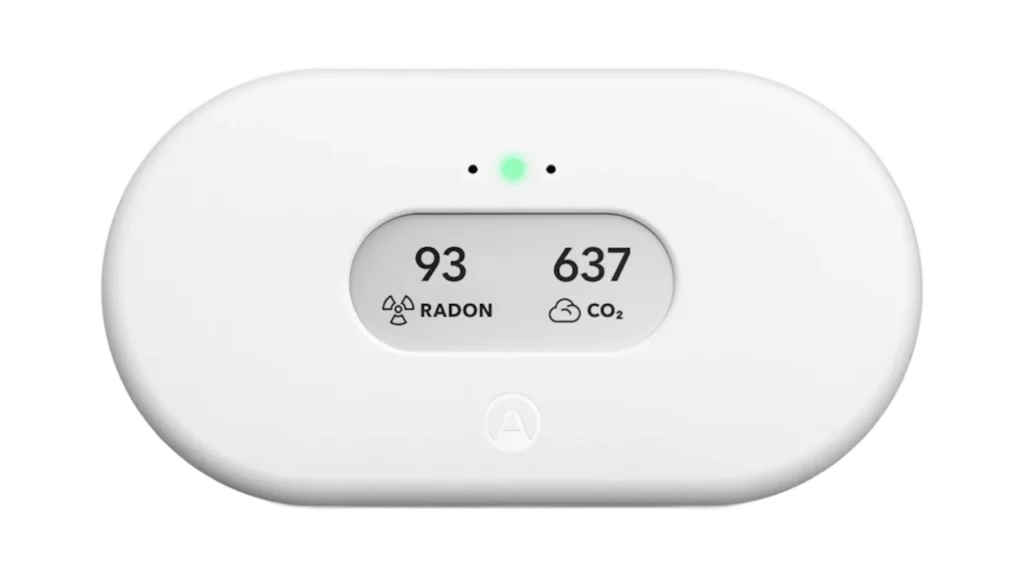
Image Credit: Airthings
If carbon dioxide is one concern among several, a combination unit makes more sense than a dedicated monitor. The Airthings View Plus pairs NDIR carbon dioxide sensing with PM2.5, VOC and radon detection in a single Wi-Fi device, and it is the only consumer option covering radon.
That comes at a significant price step, and radon needs time to settle: Airthings quotes about 10 percent accuracy after 7 days and about 5 percent after 2 months. Our guide to which sensor each room needs covers where a combination unit beats a specialist and where it does not.
The Carbon Monoxide Mix Up That Costs People Money
Several popular roundups list the Amazon Smart Air Quality Monitor as the Alexa pick for carbon dioxide. It does not measure carbon dioxide. Amazon says so directly in its own product FAQ.
What the Amazon Smart Air Quality Monitor actually contains is a Figaro electrochemical sensor for carbon monoxide, alongside a Sensirion module handling PM2.5, volatile organic compounds, temperature and humidity. Amazon also states it is not a substitute for a certified alarm.
Carbon monoxide and carbon dioxide are unrelated problems. Carbon monoxide is a combustion byproduct that can kill you, and it belongs to a certified CO alarm. Carbon dioxide is a ventilation signal that makes you sleep badly. One letter apart, entirely different purchases, and the resemblance costs people real money every year.
Where the Ecosystem Gaps Are
Coverage across the major platforms is decent, though it depends on which device you choose:
- Apple Home, Google Home, Amazon Alexa and Samsung SmartThings: all four are reachable through the SONOFF AirGuard via Matter, through the IKEA ALPSTUGA via Matter over Thread, or through the SwitchBot Meter Pro with a SwitchBot Hub added.
- Thread: the ALPSTUGA is the practical option.
- Zigbee and Z-Wave: no mainstream consumer carbon dioxide monitor exists for either protocol. This is a real gap rather than an oversight on our part. If your setup is built entirely on Z-Wave, your route to carbon dioxide sensing runs through a Matter or Wi-Fi device bridged into your hub.
Getting an Accurate Reading Once It Arrives
Hardware choice is only half the job. Placement decides whether the number means anything.
- Mount it at breathing height. Somewhere between seated and standing level, roughly one to one and a half metres up.
- Keep it away from doors, windows and vents. Fresh air blowing across the sensor produces a flattering reading of a stuffy room.
- Do not put it right beside your head. Your own exhaled breath will skew a nearby sensor badly. Keep at least an arm’s length between you and the device.
- Calibrate it in fresh air after setup. Most units expect an outdoor baseline near 400 ppm. SwitchBot runs a five-minute routine in the app, Aranet requires exposure to outdoor air, and several devices recalibrate automatically on a weekly cycle.
- Repeat calibration roughly once a year. Sensors drift. A yearly trip outside keeps the baseline honest.
One last point on automatic baseline calibration. Many sensors assume that at some point during each week the room returns to outdoor levels, and they reset accordingly. In a room that is never properly ventilated, that assumption fails and the device slowly convinces itself that stale air is normal. If a room genuinely never gets fresh air, calibrate it by hand instead.
Which One Should You Buy?
- You want the most trustworthy number: the Aranet4 Home.
- You want one clear screen and already use SwitchBot: the SwitchBot Meter Pro CO2, ideally on USB-C.
- You want CO2 to trigger a fan or purifier: the SONOFF AirGuard CO2.
- You already have a Thread border router and want the cheapest option: the IKEA ALPSTUGA.
- You also care about radon: the Airthings View Plus, at a higher price.
Whatever you pick, check that the listing says NDIR. If it says eCO2 or names no sensor at all, skip it.
FAQ
What is a good CO2 level indoors?
Below 1000 ppm is comfortable. Between 1000 and 1400 ppm the air is stuffy and worth ventilating, and above 1400 ppm you should act. Outdoor air sits at roughly 400 to 420 ppm.
Are cheap CO2 monitors accurate?
It depends on the sensor, not the price. A genuine NDIR sensor measures the gas directly. An eCO2 device only estimates it from a VOC sensor, and errors of 500 ppm or more are common.
Does a CO2 monitor detect carbon monoxide?
No. They are different gases and different purchases. Carbon monoxide needs a certified alarm, and our guide to smart CO detectors covers what to buy and where to put it.
How often should I calibrate a CO2 monitor?
About once a year. Aranet recommends a yearly calibration for the Aranet4 Home, done by putting the device in fresh outdoor air at roughly 420 ppm.
Which CO2 monitor works with Apple Home?
The SONOFF AirGuard CO2 and the IKEA ALPSTUGA both use Matter, so they can join Apple Home. The ALPSTUGA needs a Thread border router, and our guide to Thread explains what that is. The SwitchBot Meter Pro CO2 works through its own hub.